Royal Holloway Campus Map
The RHUL Map That Walks You There
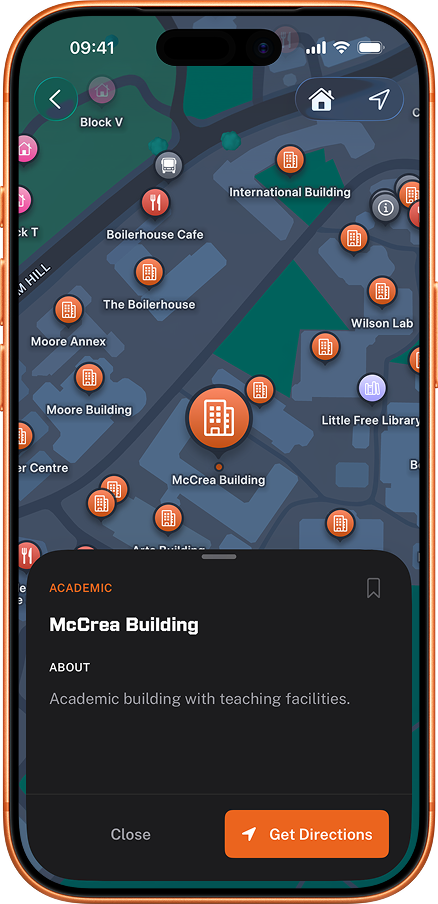
Search any building and get walking directions over real campus footpaths. From Founder's to McCrea, the Davison to the Sports Centre. Works offline.
How it works
Up and running in seconds.
Search any building
Type a building name or browse the map.
Get walking directions
Routes follow the real campus footpaths and show the walk time.
Arrive on time
Follow the route from where you're standing now.
Why people use it
Every academic building
Every academic building has a labelled pin, including Founder's, Bedford and the Emily Wilding Davison Building's 24/7 reading room.
Every residence hall
Every hall is on the map with its main entrance pinned, including Founder's, Reid, Runnymede and Highfield Court.
Real walking routes
Directions follow the actual footpaths and roads on campus rather than straight lines through buildings.
Works completely offline
The map and walking routes are stored on your device, so building locations, directions and GPS all keep working without an internet connection.
Uses your live GPS location
Tap any building and the route starts from wherever you actually are, not from the campus centre.
Off-campus too
Places further than 5km from campus hand off to your device's default maps app instead of trying to route across the M25.
What people say
"Spent half of freshers week lost trying to find McCrea. Wish I had this app then."
"The map helped me find the music practice rooms which are literally hidden."
"No more wandering round at 8am trying to work out which building my lecture's in."
"Gave my phone to a visiting friend and they found their way around campus on their own."
Frequently asked questions
Which buildings can I find on the Royal Holloway campus map?
Every public building on campus. Founder's Building (Grade I listed, opened by Queen Victoria in 1886, home to the Picture Gallery and Founder's Dining Hall), the Bedford Building (Engineering, Physical and Mathematical Sciences), the Emily Wilding Davison Building (library, student services, 24/7 reading room), McCrea, Moore, Bourne, the Arts Building, the Hub, the Chapel, the Sports Centre, the Students' Union building, the Health Centre, and every residence hall (Founder's, Reid, Runnymede, Gowar, Wedderburn, Penrose, Tuke, Butler, Williamson, George Eliot and Highfield Court). Smaller landmarks like the Picture Gallery and the music practice rooms are also pinned. Which hall is which, and how far each one is from teaching, is covered in the guide to Royal Holloway halls and student accommodation.
Does the campus map work offline?
Yes. The map and walking routes are stored on your device, so building locations and directions work without any internet connection. Your GPS position needs device location services enabled but does not need data. Anything that reads live information, such as laundry machines, events and news, does need a connection.
How long does it take to walk across the Royal Holloway campus?
The campus is 135 acres of parkland between Windsor and Heathrow. End-to-end (Founder's to the Sports Centre via Bedford and the Hub) is about 12 to 15 minutes at a normal pace. Most building-to-building walks in the academic cluster are 3 to 7 minutes. The app gives you the exact route and time from where you're standing. The Sports Centre end of that walk is covered in the Royal Holloway gym and sport guide.
Can I find specific rooms inside Royal Holloway buildings?
Connect your timetable and every lecture and seminar arrives with its room already matched to a building pin, so "EWD-1-04" becomes the Emily Wilding Davison Building with walking directions from where you are standing. The map itself routes to the building entrance rather than navigating inside it, and the room code is shown alongside so you know where to go once you are in. See how to find your Royal Holloway timetable.
Is the campus map official Royal Holloway?
No. RHUL Mobile is independent of Royal Holloway, built and run by SHACKSOLUTIONS LTD. The map data is OpenStreetMap (community-maintained, free to use), and the building positions and labels are manually curated against the official RHUL maps and verified on campus.